Today we’ve released a few enhancements to the new post editor, fixed some bugs, created a new one or two, and left a handful of things to fix later.
New Stuff
Things Left To Add

New Stuff
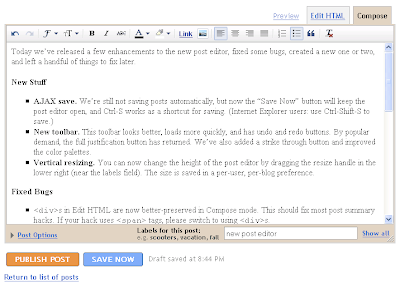
- AJAX save. We’re still not saving posts automatically, but now the “Save Now” button will keep the post editor open, and Ctrl-S works as a shortcut for saving. (Internet Explorer users: use Ctrl-Shift-S to save.)
- New toolbar. This toolbar looks better, loads more quickly, and has undo and redo buttons. By popular demand, the full justification button has returned. We’ve also added a strike through button and improved the color palettes.
- Vertical resizing. You can now change the height of the post editor by dragging the resize handle in the lower right (near the labels field). The size is saved in a per-user, per-blog preference.
- s in Edit HTML are now better-preserved in Compose mode. This should fix most post summary hacks. If your hack uses tags, please switch to usings.
- Lists created in Compose mode can now have new items added to them after switching to Edit HTML and back.
- Line breaking is no longer lost when editing a post in the old editor that was first written in the new editor.
- Nested block-level elements no longer create odd blank lines.
- Non-breaking spaces now consistently appear as in Edit HTML mode.
- The publish and save buttons wrap oddly on Mac browsers.
- The Font Size menu has 4 sizes instead of 5, and “normal” looks small.
- Paragraph tags are lost when switching from Edit HTML to Compose.
- The Blockquote button still behaves oddly, especially in Internet Explorer.
- The URL an image links to cannot be changed without using Edit HTML mode.
- Images inserted with this editor do not pick up border styles from the blog template.
- Inserting a new link with the link dialog loses your place in the post.
Things Left To Add
- Toolbar in Edit HTML mode
- Autosave
- Spellcheck
- Video upload
- FTP image upload
- Bi-directional text input and Indic transliteration
- and a handful of smaller things too numerous to include here


