We’ve just added
geotagging to the
new post editor on
Blogger in draft. With geotagging, you can add a location to your each of your blog posts. Just as time stamps help readers find posts from a certain date or time, geotags give your readers a way to browse posts near a specific location.
Adding a geotag to your post is easy. Log into
draft.blogger.com, open the post editor, and
click the add location link below the main text field.
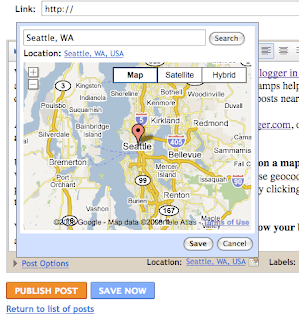
Use the location editor to
search, drag, click and zoom on a map to choose and save a location. We’ll try to label the location you choose using our reverse geocoder, which looks up a name for a point on the map. You can also
edit the location name by clicking the blue location name text below the search field.
When you publish your post, the geotag
is displayed below your blog post as a link, which will open up
Google Maps.
We also include each post’s location in your blog’s RSS and Atom feeds using
GeoRSS, a standard for geotagging. This means that feed readers, map applications and search engines can associate your posts with their locations.
We’re still working on other ways to show geotag information on your blog. Brian, the Google engineer who created this feature in his
20% time, has written a gadget that will display your posts on a map. To add it to your blog, click “Add Your Own” on the “Add a Gadget” page and paste in this URL:
http://blogmap-gadget.googlecode.com/svn/trunk/blogmap.xmlGeotagging has a few
known issues. We'll be addressing them shortly, but here are some suggested workarounds for the near-term:
- The location editor is hidden behind the text field in the Edit HTML tab. Please switch to the Compose tab to view and edit locations.
- A geotag cannot be removed from a post once it has been saved. If you need to remove a geotag, please copy your post content into a new post and delete the geotagged post.
- Update 2:33pm: If you have a customized template and you don't see the "Location:" byline, you may need to reset your blog's widget template. Do this by going to the Layout > Edit HTML tab in your dashboard, and then clicking Revert widget templates to default below the main text field.
- Update 2:33 pm: Some users are having issues with the blog post map gadget. Brian is investigating.
What types of posts are you adding a location to? What other functionality would you like to see in this feature?
Leave us a comment and let us know what you think!