blogger eklenti etiketine sahip kayıtlar gösteriliyor. Tüm kayıtları göster

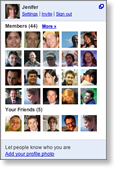
Google Friend Connect Members Gadget

Members Gadget
The Google Friend Connect Members Gadget allows visitors to:
- Join your blog
- Sign in and out
- See pictures of other blog members
- See pictures of their friends
- Explore other members' profiles
- Invite other people to join your blog
Many blogs put this gadget on their home page. You can choose the size and colors of this gadget, to make it conform to your blog.


You can find the gadget here.
Read More!

Blogger Reactions Widget

Good news! Blogger has another feature which is simply "Reactions" , with this new feature it will be easy for us to get feedbacks from our visitors.I just liked it!

To enable the reactions widget, make sure you’re using Blogger in draft mode. Then switch to the Layout settings tab for your blog and in your Blog Posts page element, click the Edit link. In the new window which opens, you’ll see the customizable reactions item.

Read More!

Add Technorati Authority button to your blog

Add Technorati Authority button to your blog

Introduction

TechnoratiTechnorati is a search engine focused on tracking blogs. According to their about page, they currently tracking 112.8 million blogs and over 250 million pieces of tagged social media.

Technorati Authority is the number of blogs joined Technorati linking to a website. The higher the number, the more Technorati Authority the blog has. It is important to note that they measure the number of blogs, rather than the number of links. So, if a blog links to your blog many times, it still only count as +1 toward your authority.

How to add

The result after adding the code is something like this (it is not my Technorati Authority lol):

Both Blogger and Wordpress users can add this button easily by using HTML widget. Yes, use HTML widget whenever you want to add some html code to your blog.

Paste the code below to your widget and you are done. Ah, remember change to text in blue to your link ;) (do not use mine, it is a small number lol )


ffb.ceoxi.com?sub=tr_authority_t_ns’ style=’color:#4261DF’>View blog authority

Hint: you should not add it when your authority is too low :P . I show my number to write this tutorial only hahaha

Bonus

It is better when we also put a button to get readers add your blog to their favourites.

The code is below (in case you want to add). Remember to change my link to yours.

http://themelib.com“>”Add

The final result in my blog is

ThemeLib Technorati Authority widget

Look great, huh ? You can test it by adding my blog to your favourites. I am very appreciate :)

Read More!

Blogger'da wordpress gibi etiket bulutu

Blogger kullananlar...
Blogger'da wordpress gibi etiket bulutu kullanmak istiyorsanız bu yazıda anlatacaklarımı uygulayın ve sizde benim blogumdaki gibi bir etiket bulutuna sahip olun.(aslında artık o kadar havası kalmadı ama olsun :) )
önce yapacağımız kodları nereye nasıl koyacağınızı söyleyelim: yerleşim - html'yi düzenle - sayfa ögesi ekle - HTML/JavaScript - bloga ekle
şimdi yukarıda gösterdiğim yola koyacağınız kodları verelim;

<-span style="font-size:120%;"-> <-a href="http://blogun.blogspot.com/search/label/etiket"-><-span style="color:#606060;"->etiket<-/span-><-/a-><-/span->

kodların açıklamaları ile etiketlerin görselliğini özelleştirebilirsiniz
kodların açıklaması:
font-size:120% - etiketlerin büyüklüğünü bu sayıyı düşürerek yada çoğaltarak ayarlayabilirsiniz
color:#606060 - etikelerin rengini bu kodu değiştirerek ayarlayabilirsiniz ( renk kodlarına buradan bakabilirsiniz )

örnek: blogunuzdaki wallpaper etiketli yazılar için aşağıdaki uygulama doğrudur


<-span style="font-size:120%;"-> <-a href="http://blogun.blogspot.com/search/label/wallpaper"-><-span style="color:#606060;"->wallpaper<-/span><-/a-><-/span-> Read More!