 )
)He released this wordpress theme on 21 June, I came across it on 24 June, and finally it’s available for blogger on 26 June

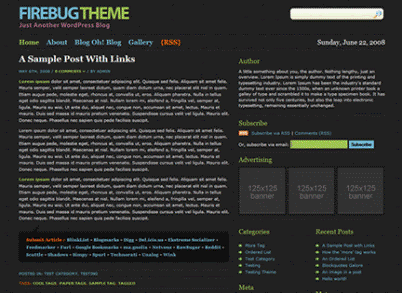
DEMO | DOWNLOAD
Featured included :
 Press Ctrl+F to find these lines and change them if you want
Firebug Blogger Template comes under a Creative Commons License. This means it is free to use on your blog as long as the credit link in the footer is kept intact. I hope everyone enjoys this theme and please don’t forget to leave comments as they are precious!
P/s: I am really annoyed with social bookmark code of this template. I did more than ten times to convert it from wordpress (html + php code) to blogger (html + blogspot code)
Want to try this ? Here is a part of the code (please do not see the answer below if you do want to try )

Featured included :
- Two/Three/Four columns based on your customization
- Built-in Search box
- Built-in RSS posts feed and RSS comments feed
- Space for 125×125 banner ads
- Built-in social bookmarks
Install Firebug blogger template
Step 1. Change Blog’s Logo
Press Ctrl+F to find this linehttp://i286.photobucket.com/albums/ll96/themelib/firebug/logo.gifChange this link with your hosted logo link 387×72 pixels (not sure about hosting services ? Read this post)
Step 2. Change the Navigation bar
Step 3. Change Author information + Ads boxes in Sidebar
Find these lines and change themand
Author
A little something about you, the author. Nothing lengthy, just an overview. Lorem Ipsum is simply dummy text of the printing and typesetting industry. Lorem Ipsum has been the industry’s standard dummy text ever since the 1500s, when an unknown printer took a galley of type and scrambled it to make a type specimen book. It has survived not only five centuries, but also the leap into electronic typesetting, remaining essentially unchanged.
Of course, if you don’t need Author information and/or Ads boxes, feel free to delete them.
Advertising
http://www.widgetbucks.com/home.page?referrer=2374010‘>http://images.widgetbucks.com/images/referral/125×125_A.gif‘/> http://themelib.com‘>
Step 4. Change RSS feed links (optional)
Press Ctrl+F to find these linesYou can ignore this section as default or redirect them to Feedburner. If you want to change to Feedburner, please read the post Mange your feed with Feedburner
Firebug Blogger Template comes under a Creative Commons License. This means it is free to use on your blog as long as the credit link in the footer is kept intact. I hope everyone enjoys this theme and please don’t forget to leave comments as they are precious!
P/s: I am really annoyed with social bookmark code of this template. I did more than ten times to convert it from wordpress (html + php code) to blogger (html + blogspot code)
Want to try this ? Here is a part of the code (please do not see the answer below if you do want to try
)And the answer is
I think we should choose Addthis as an alternative for those Social Bookmarks. Uhm, I will write a post about it soon


0 yorum:
Yorum Gönder
Yorum Yazarken Türkçemizi Doğru Kullanalım!