Recent Entrecard droppers widget
The logic of this widget is the same as Recent Posts and Recent Comments widgets
Step 1. Log-in to your EntreCard dashboard
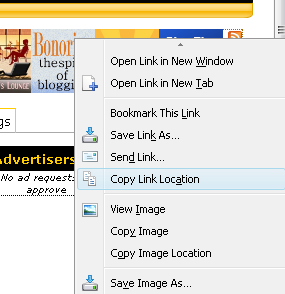
Step 2. Right click on the RSS button on the top right window and choose option “Copy Link Location” to copy your link to clipboard.

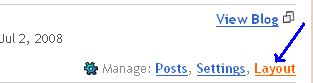
Step 3. Login to your Blogger account
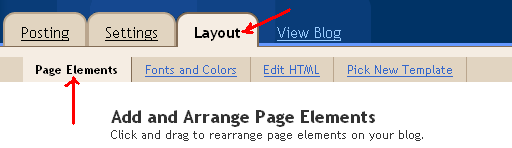
Step 4. Click on the link “Layout”
Step 5. Make sure you are in tab “Page Elements”
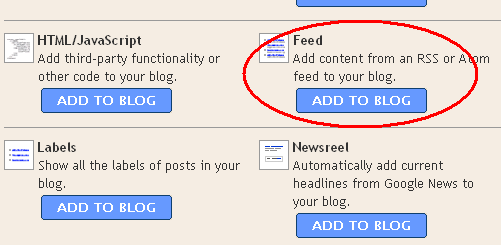
Step 6. Choose a place where you want to put your widgets on, then click “Add a Page Element”. When a pop-up window is opened, choose a Feed element (its location is in the middle of the pop-up window) then click “Add to Blog”
Step 7. Press Ctrl+V to paste the link you put to clipboard at Step #2
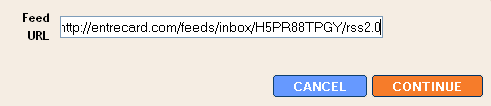
Step 8. Change title, options if you want
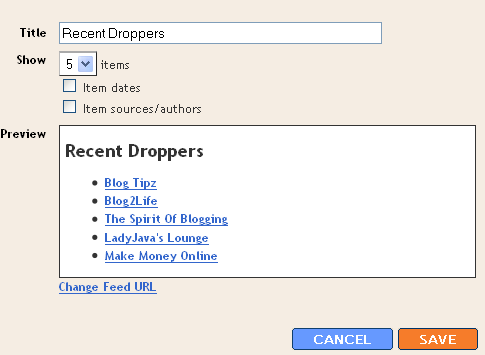
Step 9. Click Save and DONE 
That’s all. Easy, huh ?
If you encounter any problem, feel free to ask me here 


0 yorum:
Yorum Gönder
Yorum Yazarken Türkçemizi Doğru Kullanalım!